
Core Web Vitals are three scores Google uses to measure whether your page feels fast and steady to real people. They affect rankings, but not all of them equally. Here is what each one means, which problems break them, and exactly how to fix the issues you see in PageSpeed Insights.
Core Web Vitals are three scores that measure whether a web page feels fast and stable to real users. They are part of Google’s page experience signals and they can affect where your page ranks in search. The three scores measure how fast the main content shows up, how much the page jumps around while it loads, and how quickly the page reacts when you tap or click something. All three are based on real data from actual Chrome users, not just lab tests. You can read the official definitions in Google Search Central’s Core Web Vitals documentation.
What Is LCP (Largest Contentful Paint) and What Counts as a Good Score?
LCP measures how long it takes for the biggest visible piece of content on the page to load. That biggest element is usually a hero image, a large heading, or a big block of text. Google treats anything under 2.5 seconds as good and anything over 4 seconds as poor. LCP is the score most people notice first, because it is basically the moment the page stops looking empty.
The most common causes of a slow LCP are large uncompressed images, a slow server, and CSS or JavaScript that blocks the browser from showing anything. Fixing LCP usually means optimizing your largest image (compress it, convert it to a modern format like WebP or AVIF, and tell the browser to load it first using the fetchpriority attribute), improving server response times, and removing scripts that stop the page from drawing.
What Is CLS (Cumulative Layout Shift) and How Do You Stop the Page From Jumping?
CLS measures how much the page moves around while it is loading. If you start reading an article and the text suddenly jumps down because an image loaded above it, that is layout shift. Google’s target is a CLS score below 0.1. It sounds like a tiny number, but it lines up with how annoying it feels to lose your place or tap the wrong button.
CLS almost always comes from images and embeds that do not have their dimensions set in the HTML. When the browser loads the page, it reserves no space for those images, then shoves everything down once the images appear. Fix it by adding width and height attributes to every image tag so the browser knows how much room to save. Late-loading fonts that cause text to reflow are another common cause, and you can read how Google scores all of this in the Core Web Vitals documentation.
What Is INP (Interaction to Next Paint) and Why Is It the Hardest One to Fix?
INP measures how long any interaction with the page takes to produce a visible response. INP replaced the older FID metric in March 2024. Clicking a button, opening a menu, and selecting text all count as interactions. Google wants every interaction to respond in under 200 milliseconds, which is fast enough that the page feels like it reacts instantly.
The main cause of poor INP is too much JavaScript running on the main thread. This is especially common on sites built with heavy page builders, sites loading dozens of analytics and marketing scripts, and shops with complex cart interactions. Diagnosing INP takes browser DevTools and a real understanding of JavaScript performance. Our Core Web Vitals service handles this in detail, and if your site runs on WordPress, our WordPress SEO service deals with the page-builder bloat that usually causes it.
Google uses real-user field data from the Chrome User Experience Report for ranking decisions. A Lighthouse score of 95 does not guarantee good field data. Always check your Search Console Core Web Vitals report to see how real users are experiencing your pages.
| Metric | Value | Change | What it means |
|---|---|---|---|
| LCP | Good: under 2.5s | High impact | Focus: compress hero image, faster server, remove render-blocking resources |
| CLS | Good: under 0.1 | Medium impact | Focus: add image dimensions, stable fonts, no injected content above existing text |
| INP | Good: under 200ms | Medium impact | Focus: reduce JavaScript, defer non-critical scripts, simplify interactions |
Which Core Web Vital Matters Most for Rankings?
LCP has the highest practical impact on rankings because it is the one users notice most directly and the one with the most room to improve on most sites. CLS fixes are often quick wins that take an afternoon. INP is the hardest to fix and needs real JavaScript expertise. So the smart order is simple: start with LCP, clean up CLS, then tackle INP.
Start with LCP and use Google PageSpeed Insights or Search Console to see where you stand. Most sites can improve LCP a lot by doing three things: compressing images, using a CDN, and removing or deferring one or two heavy scripts. If you want a full audit of every issue below, our technical SEO service covers the whole list.
The Most Common Core Web Vitals Problems in PageSpeed Insights and How to Fix Them
PageSpeed Insights groups its findings into Insights and Diagnostics, and the same handful of problems show up on almost every site. Each one below maps to a specific metric and has a clear fix. Work through them in order of impact, and re-test after each change so you can see what actually moved the score.
How Do You Fix Render-Blocking Requests?
Render-blocking requests are CSS and JavaScript files that the browser must download and process before it can paint anything. While they load, your visitor stares at a blank screen, which pushes your LCP up. Fix it by inlining the small bit of CSS needed for the top of the page, loading the rest later, and adding defer or async to scripts that are not needed right away. Removing one or two render-blocking files is often the single biggest LCP win you can get.
What Is a Forced Reflow and How Do You Stop It?
A forced reflow happens when JavaScript reads something about the page layout (like an element’s width) and then immediately changes the layout, forcing the browser to recalculate positions on the spot. Do this in a loop and the browser recalculates over and over, which freezes the page and wrecks your INP. Fix it by batching your work: read all the layout values you need first, then make all your changes second. This is a code-level fix, so it usually means cleaning up a plugin or a custom script.
What Does “Reduce Unused JavaScript” Mean and How Do You Fix It?
Unused JavaScript is code the browser downloads and parses but the page never actually runs. PageSpeed Insights even shows you the estimated savings, for example 65 KiB. Every kilobyte still costs download and processing time, which hurts both LCP and INP. Fix it by removing plugins and libraries you no longer use, splitting big bundles so each page only loads what it needs, and lazy-loading code for features that appear lower down the page. On WordPress, a lot of unused JavaScript comes from plugins that load on every page even when they are only needed on one.
How Do You Fix Long Main-Thread Tasks?
A long main-thread task is a single chunk of JavaScript that runs for more than 50 milliseconds without stopping. While that task runs, the browser cannot respond to taps or clicks, so any interaction during that window feels laggy and your INP suffers. PageSpeed Insights flags how many it found, for example 2 long tasks. Fix it by breaking big jobs into smaller pieces, moving heavy work off the main thread where possible, and delaying non-essential scripts until after the page is interactive.
What Are Non-Composited Animations and Why Do They Hurt Performance?
A non-composited animation is an animation that forces the browser to redo layout or painting on every frame instead of handing the work to the GPU. Animating properties like width, height, top, or left causes this, and it makes animations stutter while blocking other work. Fix it by animating only transform and opacity, which the GPU can handle smoothly without recalculating the whole layout. PageSpeed Insights usually points to the exact element, for example 1 animated element found.
How Do You Read the Network Dependency Tree and the LCP Breakdown?
The network dependency tree shows long chains of requests where each file has to wait for the one before it to finish. A deep chain delays your most important content, so the goal is to flatten it. Use preconnect to warm up connections early and preload to start fetching your most important files sooner. The LCP breakdown splits your LCP time into four parts: time to first byte, load delay, load time, and render delay. Read which slice is biggest, then fix that one first instead of guessing.
How Do Third-Party Scripts Slow Down Your Site?
Third-party scripts are tools you load from other companies, like analytics, ads, chat widgets, and social embeds. They run on your page using your visitor’s device, so a slow third party becomes your slow page, and the PageSpeed “3rd parties” section shows you which ones cost the most. Fix it by removing anything you do not truly need, deferring the rest so they load after your content, and loading widgets like live chat only when someone interacts with them. Most sites can drop two or three scripts and feel the difference straight away.
What Are “Layout Shift Culprits” and How Do You Find Them?
The “layout shift culprits” report lists the exact elements that moved and caused your CLS score. This saves you from guessing, because it names the image, ad, or banner that did the damage. Fix each culprit by reserving space for it before it loads: set width and height on images and videos, give ad slots a fixed size, and avoid injecting content above text people are already reading. If a cookie banner or notification pushes the page down, position it so it overlaps instead of shoving everything below it.
Does a CDN Actually Speed Up Core Web Vitals?
A CDN speeds up Core Web Vitals by serving your files from a server physically close to each visitor. A content delivery network keeps copies of your images, CSS, and JavaScript in data centers around the world, so a visitor in another country does not have to wait for data to travel from your single home server. This mostly improves time to first byte and load time, which are two of the biggest pieces of LCP. For sites with a global or far-away audience, adding a CDN is one of the easiest performance wins available.
How Do Web Fonts Cause Layout Shift and Slow Loading?
Web fonts hurt performance when the browser hides or swaps text while it waits for a custom font to download. If text loads in one font and then jumps to another with different spacing, that movement adds to your CLS. Fix it with font-display: swap so text shows in a fallback font right away, preload the one or two font files you use most, and pick a fallback font with similar spacing so the swap barely shows. Loading fewer font weights also cuts download time.
| PageSpeed flag | What it means and how to fix it | Main metric |
|---|---|---|
| Render-blocking requests | CSS or JS that delays painting. Inline critical CSS, defer or async the rest. | LCP |
| Reduce unused JavaScript | Code the page never runs. Remove unused plugins, split bundles, lazy-load. | INP / LCP |
| Forced reflow | JS reads then changes layout repeatedly. Batch all reads first, then writes. | INP |
| Long main-thread tasks | JS jobs over 50ms block input. Break into smaller chunks, defer non-essentials. | INP |
| Non-composited animations | Animating layout properties. Animate only transform and opacity instead. | CLS / INP |
| Network dependency tree | Long chains of requests waiting on each other. Use preconnect and preload to flatten. | LCP |
| LCP breakdown | Splits LCP into TTFB, load delay, load time, render delay. Fix the biggest slice first. | LCP |
| 3rd parties | Analytics, ads, chat, embeds running on your page. Remove, defer, or load on interaction. | INP / LCP |
| Layout shift culprits | Names the elements that moved. Reserve space with width and height, fixed ad slots. | CLS |
| No CDN / slow server | Files travel too far. Add a CDN and caching to cut time to first byte. | LCP |
| Web fonts | Late font loads cause swaps. Use font-display swap, preload, matched fallbacks. | CLS / LCP |
What Is the New Agentic Browsing Test in PageSpeed Insights and Lighthouse?
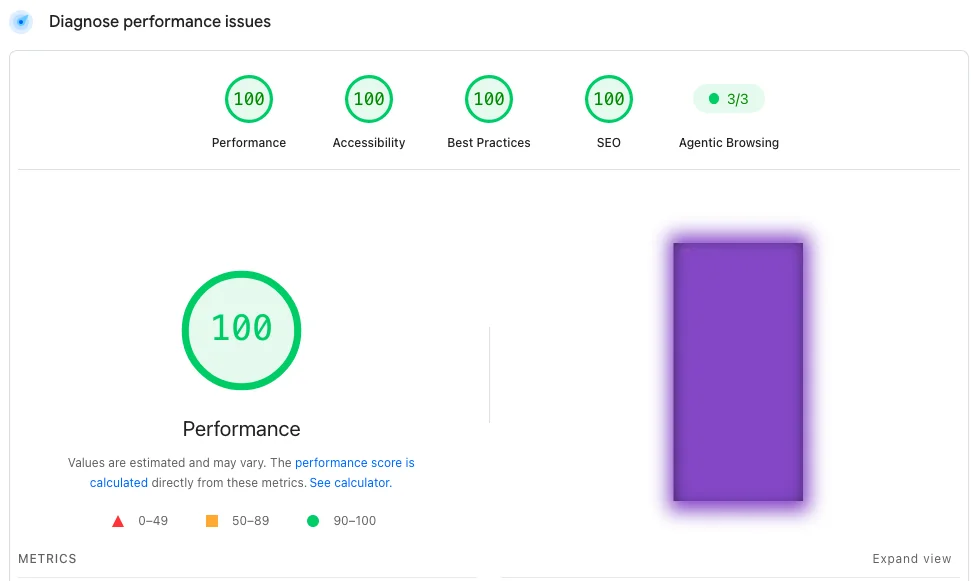
The Agentic Browsing category is a new section in Lighthouse that measures how easily an AI agent can read and use your page. Lighthouse 13.3.0, released on May 7, 2026, moved this category into the default setup, and PageSpeed Insights picks it up within about two weeks of each Lighthouse release. So when you run a test now, you will likely see Agentic Browsing results sitting next to the usual Performance, Accessibility, Best Practices, and SEO scores. The official rules live in Chrome’s agentic browsing scoring guide.
Agentic Browsing does not give a 0 to 100 score like the other categories. Instead it shows a fractional score, which is a ratio of how many readiness checks your site passes, plus a pass, fail, or warning on each individual audit. Google did this on purpose: the standards for the so-called agentic web are still being worked out, so the goal right now is to hand you useful signals rather than a single grade. The checks are deterministic, which means they give the same result each time, so you can safely add them to an automated testing pipeline.
The Agentic Browsing audits look at a few specific things: whether your accessibility tree is solid (every interactive element has a clear name and role), whether your layout stays stable, whether you have an llms.txt file at the root of your site, whether your sitemap.xml is valid and linked from robots.txt, and whether you use Schema.org structured data so an agent knows what kind of page it is looking at. There is also an experimental WebMCP check, but that one needs Chrome 150 or later and a special origin trial, so most sites can ignore it for now.
The Agentic Browsing category is still under development and the standards are emerging. You will not be penalized in search rankings just for missing the newer AI features, and a clean site can pass most checks already. Treat these audits as helpful hygiene and a head start, not as an emergency.
Why Does Layout Shift Matter Even More for AI Agents?
Layout shift matters even more for AI agents because an agent often picks an element to click and then clicks it a moment later. If your page moves during that gap, the agent can miss the button or tap the wrong thing. Agents also move faster than humans, so shifts that happen while content is still loading are more likely to trip them up. This is why CLS shows up in the Agentic Browsing checks too: a stable page is easy for both people and machines to use.
What Can You Do Today to Pass the Agentic Browsing Checks?
You can pass most Agentic Browsing checks today by doing the things that already help real users. Use clean, semantic HTML with proper labels and ARIA so your accessibility tree is solid, keep your CLS low so nothing jumps around, make sure your sitemap is valid and linked from your robots.txt file, and add Schema.org structured data to your important pages. Adding a simple llms.txt file at the root of your domain covers another check. None of this is wasted work, because the same habits that make a page fast and accessible also make it readable to AI agents. Writing your content in clear question-and-answer sections, as described in our guide on how to write content for AI retrieval, helps agents pull the right answer from your page.
Yes, but as a tiebreaker signal rather than a primary ranking factor. Two pages with similar content quality and authority will see the one with better Core Web Vitals rank higher. For most queries, content relevance and backlinks matter more than CWV, but poor CWV can prevent you from reaching the top results you otherwise deserve.
The most important tool is Google Search Console, which shows you field data from real users. Google PageSpeed Insights shows both field data and lab data for individual URLs. The Chrome DevTools Performance panel is useful for debugging specific issues. Always prioritize the Search Console field data over Lighthouse lab scores for ranking purposes.
Lighthouse tests the page on a simulated slow connection with one specific device. Real users visit on many different devices, connection speeds, and locations. If real users experience your site on older phones or slower connections, their CWV data can look very different from a Lighthouse test run on a fast machine.
A forced reflow happens when JavaScript reads a layout value, such as an element’s width, and then immediately changes the layout, forcing the browser to recalculate positions on the spot. Doing this repeatedly freezes the page and hurts INP. The fix is to read all the layout values you need first, then make all your changes afterward, so the browser only recalculates once.
Yes. A CDN serves your images, CSS, and JavaScript from a server close to each visitor, which lowers time to first byte and load time. Those are two of the largest pieces of LCP. The benefit is biggest for sites with visitors far from the main server, where files would otherwise travel a long distance for every request.
The Agentic Browsing test is a Lighthouse category that measures how easily an AI agent can read and use your page. It became part of the default Lighthouse setup in version 13.3.0 in May 2026, and PageSpeed Insights now shows it alongside Performance and SEO. It does not produce a 0 to 100 score. Instead it reports a ratio of readiness checks passed, covering things like a stable layout, a clean accessibility tree, an llms.txt file, a valid sitemap, and Schema.org structured data.
No. The Agentic Browsing category is experimental and is not a ranking factor. Google built it to gather data and give site owners useful signals while the standards for the agentic web are still being defined. You will not lose rankings for missing newer AI features. The practical value is that the checks overlap with accessibility and stability work that already helps real users.